Introduction
The Incident PTT channels are an additional feature that allows users to communicate via voice chat (Push-to-Talk radio style) with other groups in the organization.
The Incident PTT Channels module enables dispatchers, supervisors, and active responders to chat in a designated incident PTT channel. The incident PTT channel is automatically assigned as soon as an incident participant (dispatcher, supervisor, or responder) presses the PTT button. The designated channel remains available as long as the incident is open and there are active responders in the incident.
Responders
Responders can receive and send messages in an incident channel from the moment they report an “Acknowledge” status in the incident. They remain active in the channel as long as they are active in the incident.
An active responder is a responder with one of the following incident statuses: “Acknowledge”, “En route”, “On-scene”, or “Done”.
Supervisors
Supervisors only have access to the channels of incidents that fall within the jurisdiction of the control centers to which they are assigned. A supervisor becomes active in a channel by logging in to an incident or by opening the specific channel in the PTT module.
Access to the Incident PTT Channels
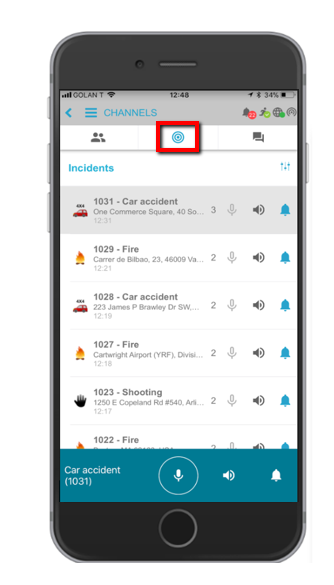
The incident PTT channels are located on the Incidents tab in the Channels (PTT) panel. Each channel displays the icon and name of the incident type, as well as the incident ID number. The channels are sorted chronologically based on the most recent message sent.
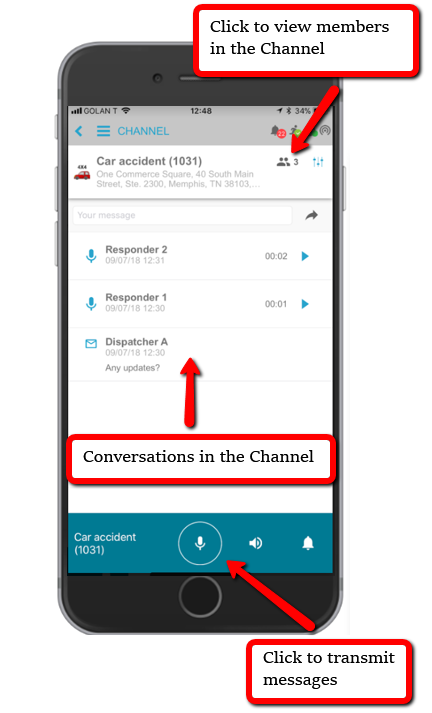
Select an incident channel to view all channel conversations. With the channel selected, you can send voice (or text) messages and view a list of channel members.