
Step 1: Opening the Dashboard
To send mobile logs, first open the app dashboard. Do this by tapping the three-line icon in the top-left corner of the screen.
Step 2: Navigate to Settings
Once in the dashboard, tap the “Settings” option.
Step 3: Go to “about”
In the settings, go to the “About” tab and tap on it.
Step 4: Navigate to the Information Menu
The app will now open the information menu. Here, tap on “LOG”.
Step 5: Select “Mail Compressed Log”
In the information menu, tap the “Mail Compressed Log” option.
Step 6: Send the Log via Email
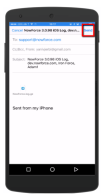
A new email message will now open with the log as an attachment. If you have multiple email addresses configured on your phone, verify that the correct email address is selected. Then click “Send” to send the log.
](https://help1.nowforce.com/Content/Resources/Images/User%20Guide/Mobile/MailSend.png)
Follow these steps to easily send mobile logs via the app.
